
| Summary |
|---|
A good starter embroidery machine should match your budget, project size, and design needs.
|
Beginners often feel confused because many embroidery machines look very similar. However, hoop size, design transfer, stitch speed, screen quality, and price can change the full experience.
The right machine helps you make simple monograms, shirts, baby clothes, towels, patches, home decor, and small custom projects. Also, it gives you more confidence as you practice new designs at home.
Still, the machine only stitches what the file tells it to stitch. Therefore, a clean digitized file matters. Digitizing Buddy provides reliable services for embroidery digitizing, so beginners can turn logos, artwork, and custom designs into smooth, stitch-ready files before they start embroidery.
- What Should You Know Before Buying an Embroidery Machine?
- What Makes an Embroidery Machine Beginner Friendly?
- 1. Brother SE700: Best Overall Embroidery Machine for Beginners
- 2. Brother PE545: Best Budget Embroidery-Only Machine
- 3. Brother PE900: Best 5 x 7 Embroidery Machine for Beginners
- 4. Singer SE9180: Best Beginner Combo Machine With a Larger Hoop
- 5. Janome Memory Craft 400E: Best Growth Machine for Serious Beginners
- Machines We Compared But Did Not Put in the Top 5
- How to Prepare Designs for Your Embroidery Machine?
What Should You Know Before Buying an Embroidery Machine?
Buying your first embroidery machine feels exciting. However, the wrong choice can limit your projects or make learning harder. So, look at your needs before you compare models.
Set a Clear Budget
Beginner machines can cost a few hundred dollars, while larger models can cost much more. Also, remember extra costs like hoops, stabilizers, thread, needles, bobbins, and design files.
Know What You Want to Make
Your project type should guide your choice. A 4 x 4 hoop works for names, small logos, and baby clothes. However, shirts, towels, patches, and home decor often need a larger hoop.
Check Beginner-Friendly Features
Look for features that make setup simple and smooth.
Helpful features include:
- Color touchscreen
- USB or wireless design transfer
- Built-in fonts
- Easy thread setup
- Adjustable speed
- Good hoop options
In addition, choose a machine that reads common embroidery file formats. As a result, you can use custom embroidery files with fewer problems.
Real Buying Concerns From Beginner Embroiderers In Facebook Group
Hi everyone !!! I’m new here
Facebook Machine Embroidery Group
I’m wanting to invest in a very beginner friendly embroidery machine. I currently have a Brother sewing machine but I’ve been so interested in embroidery! What do yall recommend?
What people are saying
Brother embroidery machines are great, start with a 5×7 hoop size l have 2 and l love them.
Literally everyone starts with a SE700. It’s like $500. 4×4 hoop. Next up would be PE900 at around $1000 and 5×7 hoop
I started with a SE700 and used it for a year, bought a preowned VM5100 because it had bigger hoops, guess what, I’m still using the 4×4 hoops, now have 2 machines. If you don’t know you’re gonna love it, get what you can afford and move up later.
A real-time Facebook embroidery group discussion shows how new users often ask the same thing before buying: which machine is easy, reliable, and worth the money? Many replies point toward Brother models and 5 x 7 hoop options, which proves why hoop size and beginner-friendly features matter.
What Makes an Embroidery Machine Beginner Friendly?
A beginner-friendly machine should make setup, design placement, and stitching feel simple. However, beginners should check more than the price before choosing one.
- Easy controls and screen
A color touchscreen helps you preview, resize, rotate, and move designs before stitching. Also, on-screen guides make threading and setup easier. - Right hoop size
Hoop size controls what you can make. A 4 x 4 hoop works for names, small logos, and baby items. However, a 5 x 7 hoop gives more room for shirts, towels, and patches. - Built-in designs and fonts
Built-in designs and lettering fonts help you practice right away. As a result, you do not need to buy many files at the start. - Simple design transfer
USB, Wi-Fi, or app-based transfer helps you move custom files to the machine faster. - Long-term value
In addition, choose a machine that fits your future goals, so you do not outgrow it too quickly.
1. Brother SE700: Best Overall Embroidery Machine for Beginners
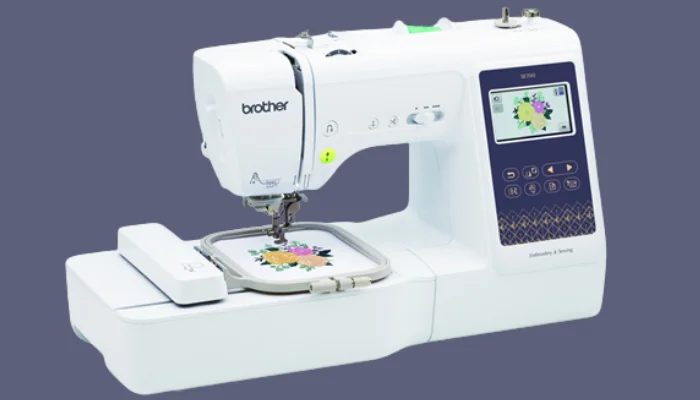
The Brother SE700 works well as a first machine because it gives you sewing and embroidery in one setup. So, beginners can practice basic stitching, repairs, monograms, and small custom designs without buying two machines.
It has a 4 x 4 embroidery field, 135 built-in embroidery designs, 10 embroidery fonts, and 103 sewing stitches. Also, it supports wireless design transfer, which makes it easier to send files from a device to the machine.
This machine fits shirts, kidswear, towels, napkins, and simple monograms. However, the 4 x 4 hoop feels small for jacket backs, large logos, and bigger custom artwork.
Brother SE700 Features and Specs
| Feature | Specs |
|---|---|
| Machine Type | Sewing and embroidery combo |
| Embroidery Field | 4 x 4 inches |
| Built-in Embroidery Designs | 135 designs |
| Built-in Fonts | 10 embroidery fonts |
| Sewing Stitches | 103 stitches |
| Screen | 3.7-inch color touchscreen |
| Design Transfer | Wireless LAN and USB |
| Best For | Beginners who want sewing and embroidery in one machine |
You can also watch this short and helpful “Brother SE700” setup video before using the machine. It gives beginners a clearer look at how to switch from sewing to embroidery and start a simple design with more confidence.
2. Brother PE545: Best Budget Embroidery-Only Machine
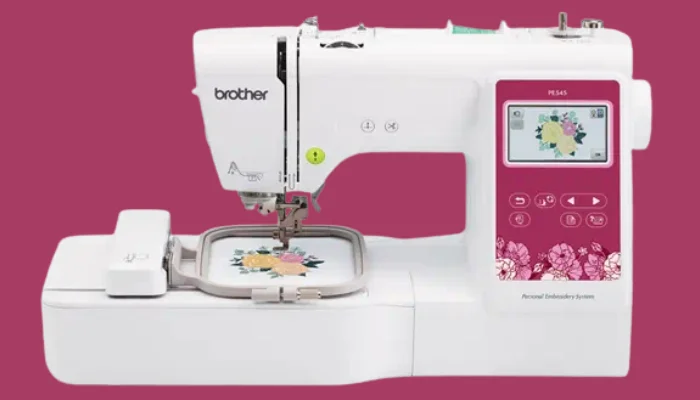
Brother PE545 is a smart pick for users who only want embroidery. Also, it works well for people who already own a sewing machine and do not need sewing features again.
This machine has a 4 x 4 hoop, 135 built-in embroidery designs, 10 lettering fonts, and a 3.7-inch color LCD screen. In addition, wireless transfer helps beginners move designs with less hassle.
It works best for names, monograms, small patches, baby items, gift projects, and simple craft designs. However, it does not sew. So, users must choose another machine for regular sewing tasks.
The 4 x 4 hoop also limits larger designs. Still, it gives beginners a clean and simple way to start embroidery without too many extra features.
Brother PE545 Features and Specs
| Feature | Specs |
|---|---|
| Machine Type | Embroidery only |
| Embroidery Field | 4 x 4 inches |
| Built-in Embroidery Designs | 135 designs |
| Built-in Fonts | 10 lettering fonts |
| Screen | 3.7-inch color LCD |
| Design Transfer | Wireless LAN and USB |
| Sewing Function | No |
| Best For | Names, monograms, small patches, and baby items |
3. Brother PE900: Best 5 x 7 Embroidery Machine for Beginners
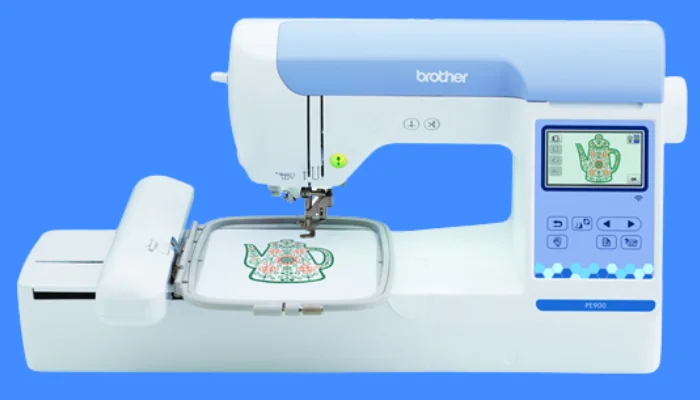
Brother PE900 gives beginners more room to create. It has a 5 x 7 embroidery field, so it works better for shirts, towels, larger names, and more detailed designs.
This machine is embroidery-only. It includes 193 built-in designs, 13 fonts, wireless LAN, and a color LCD screen. Also, the larger hoop helps growing hobbyists avoid the limits of a 4 x 4 field.
PE900 fits beginners who already know they want larger designs. As a result, they can practice more project types without moving straight into a commercial machine.
However, this model costs more than basic 4×4 machines. It also does not sew. Therefore, it is better for users who want embroidery as their main focus.
Brother PE900 Features and Specs
| Feature | Specs |
|---|---|
| Machine Type | Embroidery only |
| Embroidery Field | 5 x 7 inches |
| Built-in Embroidery Designs | 193 designs |
| Built-in Fonts | 13 fonts |
| Screen | 3.7-inch color LCD |
| Maximum Embroidery Speed | Up to 650 stitches per minute |
| Design Transfer | Wireless LAN and USB |
| Best For | Beginners who want larger designs and more creative room |
4. Singer SE9180: Best Beginner Combo Machine With a Larger Hoop
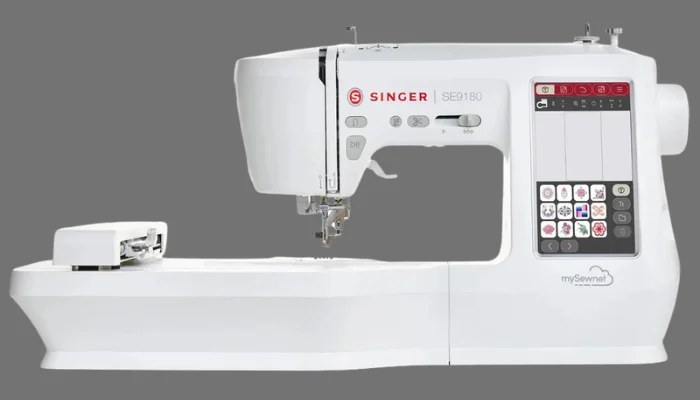
The Singer SE9180 gives beginners sewing, embroidery, and a larger embroidery field in one machine. Also, it has a modern screen-based setup, which helps users preview and control designs more easily.
It includes a 7 x 4.7 embroidery area, 150 built-in embroidery designs, 10 fonts, and 250 sewing stitches. In addition, Wi-Fi support helps with design transfer and connected features.
This machine fits users who want more room than a 4 x 4 hoop. It can handle larger shirt designs, home decor, gifts, and decorative sewing projects.
However, the learning curve may feel higher because it has many features. Still, beginners who like a modern display and want room to grow may enjoy this machine.
Singer SE9180 Features and Specs
| Feature | Specs |
|---|---|
| Machine Type | Sewing and embroidery combo |
| Embroidery Field | 7 x 4.7 inches |
| Built-in Embroidery Designs | 150 designs |
| Built-in Fonts | 10 fonts |
| Sewing Stitches | 250 stitches |
| Screen | 7-inch color touchscreen |
| Design Transfer | Wi-Fi connectivity |
| Best For | Beginners who want sewing, embroidery, and a larger field |
5. Janome Memory Craft 400E: Best Growth Machine for Serious Beginners
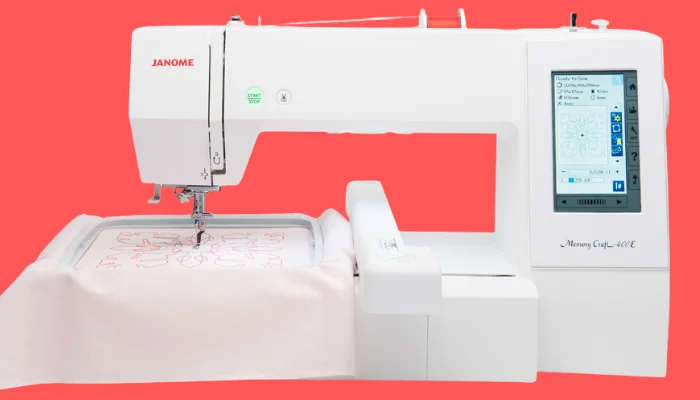
Janome Memory Craft 400E is a strong choice for serious learners. It is embroidery-only, but it gives users a larger 7.9 x 7.9 embroidery area from the start.
This machine includes 160 built-in designs, 6 monogramming fonts, USB design transfer, and full-color touchscreen editing. Also, it offers embroidery speeds up to 860 stitches per minute.
The larger hoop helps with home decor, garments, bigger logos, and more detailed projects. As a result, beginners can grow into more creative work without feeling limited too soon.
However, this machine costs more than many starter models. It also does not include sewing features. For this reason, casual users may not need this much machine at the start.
Janome Memory Craft 400E Features and Specs
| Feature | Specs |
|---|---|
| Machine Type | Embroidery only |
| Embroidery Field | 7.9 x 7.9 inches |
| Built-in Embroidery Designs | 160 designs |
| Built-in Fonts | 6 monogramming fonts |
| Screen | Full-color touchscreen |
| Maximum Embroidery Speed | Up to 860 stitches per minute |
| Design Transfer | USB |
| Best For | Serious beginners who want larger projects and long-term growth |
Which Embroidery Machine Should Beginners Choose?
- Choose Brother SE700 if you want sewing and embroidery in one machine, because it gives you more use at a lower starter cost.
- Choose Brother PE545 if you only want embroidery at a lower price and already have a sewing machine at home.
- Choose Brother PE900 if you want a larger 5 x 7 hoop for shirts, towels, and bigger custom designs.
- Choose Singer SE9180 if you want a combo machine with a bigger embroidery field and modern screen controls.
- Choose Janome 400E if you want a serious embroidery-only machine for long-term growth.
Machines We Compared But Did Not Put in the Top 5
We also checked other machines before making the final list. However, some models felt too limited or too advanced for most new users.
Brother Skitch PP1
Brother Skitch PP1 can work well for app-based beginners and small 4 x 4 projects. Also, its optional 3 x 3 hoop can help with small items and tight spaces.
However, this machine needs the Artspira app to work. It also does not have a built-in LCD screen or built-in designs. For this reason, it may not suit beginners who want a normal screen-based machine.
Bernette b70 DECO
The Bernette B70 DECO has strong features. It includes a 260 x 160 mm embroidery area, 208 motifs, a touchscreen, and 3 hoops.
Still, the higher price may feel too much for a first machine. So, we see it as a better fit for users who want a more advanced embroidery-only setup.
How to Prepare Designs for Your Embroidery Machine?
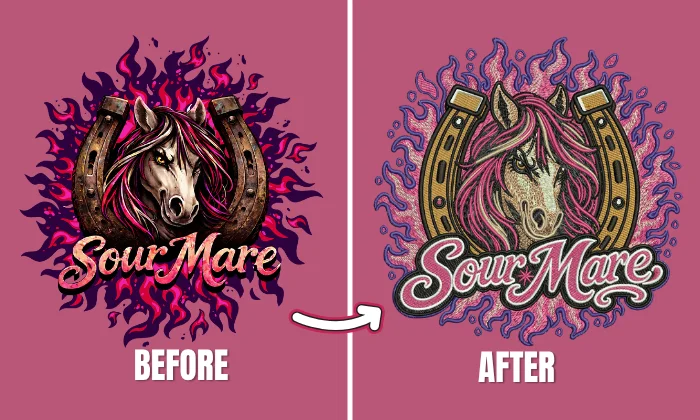
Before your embroidery machine can stitch a logo, name, or custom artwork, the design must be converted into a stitch-ready embroidery file. Standard image formats such as JPG, PNG, PDF, or SVG cannot be read directly by embroidery machines.
Embroidery Digitizing Software
You can digitize designs yourself with embroidery software. These programs let you control stitch type, density, underlay, pull compensation, and thread paths.
However, this takes time, practice, and paid software. Beginners may also face a learning curve, and wrong settings can cause thread breaks, poor stitch quality, or distorted designs.
Hiring a Professional Service
Hiring a professional embroidery digitizing service can save time and improve stitch quality. Expert digitizers understand fabric, stitch types, density, and machine settings, so they can create files that run smoothly.
Also, outsourcing lets you focus on customers, orders, and business growth instead of learning complex software. Digitizing Buddy converts logos and artwork into clean, machine-ready embroidery files for better detail and accuracy.
Final Thoughts
Choosing the right beginner embroidery machine depends on your budget, hoop size, features, and project goals. Brother SE700 works well for sewing and embroidery, while PE545 and PE900 fit embroidery-focused users. Meanwhile, Singer SE9180 and Janome 400E give more room for bigger designs.
Still, a good machine needs a clean stitch-ready file. For this reason, Digitizing Buddy can help convert your logo or artwork into a smooth embroidery file. Contact us today and get a free quote.
FAQs
Brother SE700 is a good starter choice for many beginners because it offers sewing and embroidery in one machine. It also has a color screen, built-in designs, and wireless design transfer.
A 4 x 4 hoop works for monograms, baby clothes, small logos, and simple patches. However, a 5 x 7 hoop gives more room for shirts, towels, and larger designs.
Choose a combo machine if you also want to sew. However, choose an embroidery-only machine if you already own a sewing machine or only want to focus on embroidery.
Start with your budget and project needs. A basic 4 x 4 machine usually costs less, while larger hoops, sewing features, Wi-Fi, and advanced screens often raise the price.